Five Games That Need No Words — Looking Back on the Retro Five Launch
Block Fill, Merge Pop, Make Ten, Bubble Pop and Box Push — five games with almost no text to translate, launched on Toss on October 9. This covers the rule of never using original titles, why Merge became three modes instead of three apps, the generator I built for Box Push's 101 levels, the ad and layout changes that came from testing on a real phone, and a store review blocked by a privacy policy URL
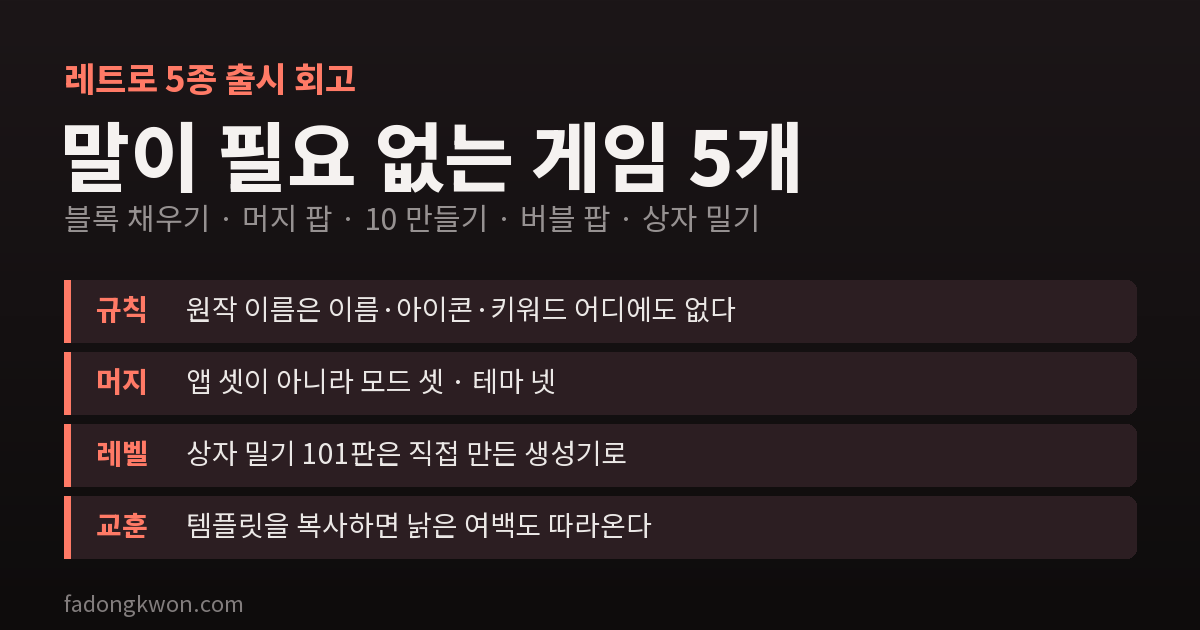
On October 9, the same day as the nine board games, I launched five more games on Toss: Block Fill, Merge Pop, Make Ten, Bubble Pop and Box Push. All five had been approved on Google Play on October 7.
In my plan this batch was labeled “Retro factory · five games without language.” Here is why it was these five, and what got in the way while building them.
Why “retro,” and why “without language”
My research found that the “retro” label itself does not sell well. What sells are the cheap, solid mechanics handed down from old arcades and puzzles: fill lines to clear them, merge matching things, group numbers that add up to 10, match three of a color, push boxes into place. Anyone can understand any of these five within seconds.
And all five need almost no text on screen. They run on numbers, colors and shapes. I already support nine languages, but the fewer sentences there are to translate, the easier it is to publish on foreign stores and web game portals, and the fewer translation mistakes there are.
Never use the original title, anywhere
None of the arcade games from around 1978–85 are out of copyright. Rules and genres are free for anyone to use, but names, characters, specific color schemes and level layouts are protected. Google Play’s repeat infringement policy in particular applies to the whole account, not to a single app. If one game is taken down over a trademark complaint, every other app in the account could be at risk.
So I set the rule first: no original title in any name, icon, screenshot or keyword. Names like Box Push and Bubble Pop simply say what you do. I turned the rule into a check that looks for such names in store text, added it to the release process, and later used it unchanged for the nine board games.
Merge as three modes, not three apps
Merge Pop has three ways to play: Drop, where you drop items from above to merge them; Shoot, where you aim and fire; and Number, where equal numbers double. It also has four themes: fruit, sports, animals and planets.
I could have split these into three apps. But splitting games that share an engine and differ only in input and container can run into Play’s repetitive content policy. Modes inside one app, on the other hand, are fine no matter how many there are, and they make the content richer. So they went into one app as modes, and on first launch the game starts straight in Drop mode with no menu. Modes and themes are changed only on the home screen.
One thing about each game
- Block Fill — place three pieces on an 8×8 grid to clear lines. The daily board sets the piece order from the date, so everyone in the world gets the same order. Only your first game of the day is recorded.
- Make Ten — group numbers in a rectangle and clear them when they add up to 10. Classic mode is 120 seconds, and when time runs out you can watch an ad for 30 more. There is also a practice mode with no time limit.
- Bubble Pop — drag to aim, release to shoot. Stage boards are generated with the level number as the seed, so a level is always the same, and in endless mode new rows keep coming down from the top.
- Box Push — all 101 levels came from a generator I built. It makes a random room shape, places boxes on the goals, pulls them backwards to scatter them, checks with a solver that the level is solvable and finds the minimum number of pushes, then sorts levels by difficulty. Stars are based on the minimum push count. Not a single level comes from an outside level set, because level layouts are protected too.
Three changes from testing on a real phone
On October 2 I tried the Toss test bundles on a real phone and fixed three things.
1. Helper features use ads from the start. In other games, helpers (here: reroll, clear small pieces, hint, longer aim line, rainbow bubble) have worked as “a few free uses per game, then ads.” For these five I switched to no free uses — watch an ad every time, with a 📺 mark on the buttons from the start. Ads only appear when you tap, and never right after a game ends.
2. Empty space at the top of the game screen. There was unexplained empty space above the game. It had three causes.
- A top margin added long ago to avoid a sound button was still there. That button had already been hidden on game screens; only the margin remained. These five games started as copies of Whack-a-Mole, and that stale margin was copied along with it.
- The safe area inset was being added twice.
- The game screen was vertically centered, which left space above it.
While fixing this I got it wrong once more. I carried over the “remove top and bottom insets” fix I had used for non-game apps, and the next day I was told the screen now overlapped the status bar and the Toss close and more buttons. Toss games run full screen, so the top safe area has to stay. I wrote about this in the board games retrospective too.
3. Mis-taps on the direction pad. In Box Push, the ▲ button sat right below “Restart,” so trying to move up could easily wipe the level. I moved the board up and put at least 32px between the two rows.
Copying a template brings its old leftovers along with its strengths. Since then, specs for new games say from the start: “game screen aligned to the top, no old top margin, leave room only for the Toss buttons.”
A review blocked by a privacy policy URL
I submitted all five to Play on October 3. Only Make Ten failed the quick check with “cannot resolve the DNS for the privacy policy URL.” Resubmitting with the same URL gave the same error. The site and DNS were fine, and the other four passed with the very same URL.
In the end, switching to the www form of the URL (which redirects to the canonical one) got it through. I never found the cause. That URL lands on the canonical page anyway, so users see no difference, and switching back risked the same error blocking other updates, so I left it as is.
Toss came on the night of October 7, once Play approval produced the game rating certificate IDs, and the games went live on October 9. The first registration process, which had just changed around then, is written up separately.
If I did it again
- Question a copied template line by line. Delete margins and conditions whose reason you do not know.
- Do not carry non-game fixes over to games. Toss games run full screen.
- Make your own levels if you can. With a generator and a solver, adding levels costs neither money nor copyright worries.
- Do not split into apps what can be modes.
All five are good for a short game. A 120-second round of Make Ten on your commute is a fine place to start.