First Apps in Toss Registration in One Pass — Submitting 14 Games with Combined App Info and Bundle Review
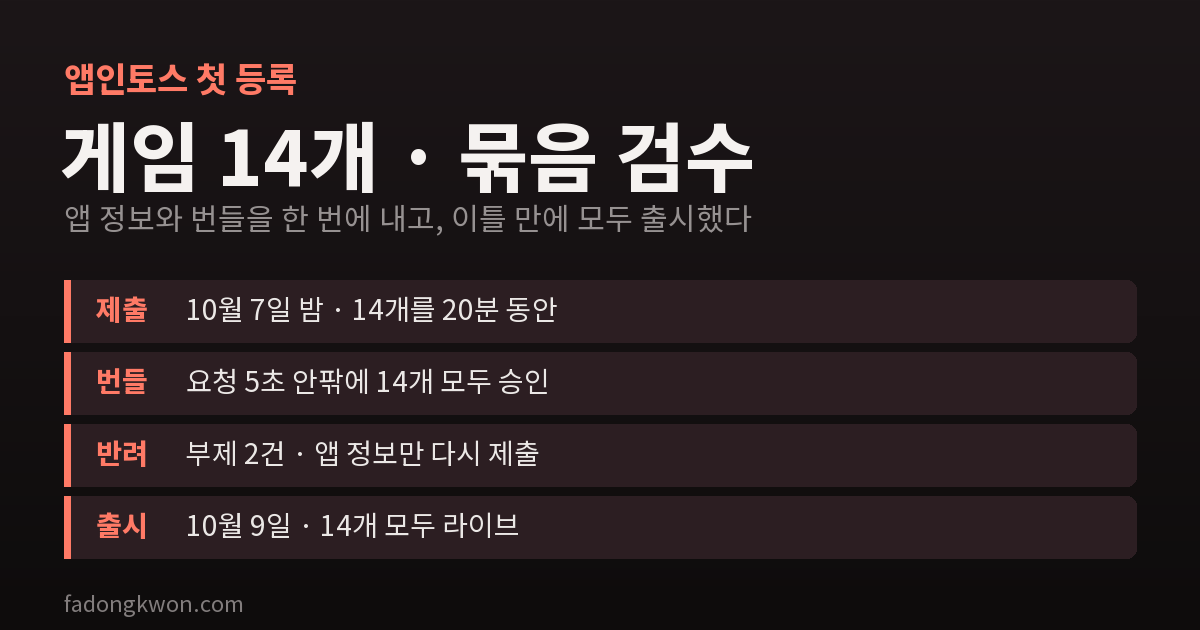
Since October 1, a new Apps in Toss mini app can have its app info and its bundle reviewed together on first registration. I submitted 14 games this way on the night of October 7. The bundles were approved within seconds, two subtitles were rejected, and all 14 went live on October 9. Here is what changed and where I got stuck
On October 1 the Apps in Toss console posted a notice titled “You can now get app info and bundle reviewed at once.” When you register a mini app for the first time, the separate reviews for app info and for the bundle are now merged into one.
That same week I had 14 games to register for the first time: 5 retro games (Box Push, Merge Pop, Bubble Pop, Block Fill, Make Ten) and 9 board games (Reversi, Four in a Row, Gonu, Checkers, Dots and Boxes, Mancala, Sea Battle, Yut Nori, Janggi). I submitted all 14 this way on the night of October 7, and all 14 went live on October 9. These are my notes from doing it.
What changed
The old flow had a fixed order. The bundle review could only be requested after the app info review (name, subtitle, description, category, screenshots, game rating) was approved. Even with the bundle finished, you waited for the app info approval first.
Now it works like this:
- The console’s “App info” menu has been merged into the “App release” menu.
- For an app being registered for the first time, pressing “Request review” on a version row in the release screen opens the app info form. The bundle’s release note and memo are already filled in.
- Fill in the three app info steps (basic info / category and exposure / game rating) and submit, and the app info and the bundle go into review together, and the results come back together.
- If it is rejected, you are told which items to fix. Fix only those and submit again.
- After the first approval, things work as before: app info and bundles are submitted separately.
How long it actually took
| When | What happened |
|---|---|
| October 7 | All 14 approved on Google Play → IARC rating certificate IDs available |
| October 7, 9:20–9:42 PM | 14 combined submissions |
| Right after | All 14 bundles approved about 5 seconds after each request |
| A few minutes later | 2 subtitles rejected (Sea Battle, Yut Nori) → resubmitted app info only |
| October 9 | All 14 live |
Game bundle reviews were already fast, so the bundle side was no surprise. What changed is that there is now one queue instead of two. Under the old flow, each app would have needed one more round trip: check that the app info was approved, then go back and request the bundle review. With 14 apps, that is 14 round trips.
Going live is still not automatic. After approval you have to press “Release” in the console yourself.
For games, the Play approval comes first
To register in the game category, step 3 asks for game rating information. I use the certificate ID of the IARC rating I get through Google Play. That ID only shows up in the Play Console after the Play Store review is approved.
So the order for these 14 was: submit to Play first on October 2–3, and once Play approved them on October 7, submit to Toss that night. The combined review shortened the wait on the Toss side, but for games, the Play approval sets the schedule up front. Non-game apps have no rating step, so they do not have this constraint.
Two rejections — both subtitles
The app info review came back within minutes. 12 passed and 2 were rejected, both for their subtitles.
Sea Battle — “Find the hidden fleet and sink it” (written as a command in Korean) Rejected for being in the imperative. The review suggested the polite “-haeyo” style or a noun phrase. I changed it to the “-haeyo” form, “you find the hidden fleet and sink it”, and it passed. I had once had a notification message flagged as imperative too, so writing subtitles in the “-haeyo” style from the start is the safe choice.
Yut Nori — “A traditional game of throwing yut and stacking pieces” In yut nori, carrying pieces together on top of each other is called eopda (to carry on your back). The word was correct, but the review seems to have read it as a typo of eopda (to not exist), which sounds almost the same. Rather than argue, I changed it to “a traditional game where you throw yut and move your pieces.” Even a correct word is best avoided if it looks like a typo of a common one.
Both apps already had their bundles approved. As the notice says, I fixed and resubmitted only the app info, and the bundles were not reviewed again. After a rejection, the “Edit” link in the red banner on the release screen opens the form with all the earlier values kept, so I only had to redo a few confirmation checkboxes.
Where I got stuck while filling it in
- The key screenshot slots. A game has four key screenshot slots, and once you fill one, that slot’s file picker disappears. I fixed an upload order and always uploaded into the first remaining slot.
- The “web board game” checkbox. These are board games, so I hesitated over whether to check it. The developer center’s service-specific notes define a web board game as a structure where players bet game money. Checking it requires a separate rating from Korea’s Game Rating and Administration Committee, plus a 19+ age limit and adult verification. These games have no betting, no game money and no payments, so I left it unchecked. Gomoku, which I released earlier under the same conditions, was approved the same way.
- The same fields, 14 times. Many values are identical across apps: the support email, the rating details, the registrant name. Typing Korean by hand 14 times invites typos, so I prepared the values in a file first and filled them in from there.
- Not available through MCP yet. You can still upload, test and query bundles through the Apps in Toss console MCP, but as the notice says, this combined submission is not supported there yet. I did only the first registration in the console’s web UI.
Summary
- First registration is now one submission, one result. The round trip of waiting for app info approval and then submitting the bundle is gone.
- If rejected, you resubmit only the items to fix. An approved bundle stays approved.
- Games have the Play approval (IARC certificate ID) in front, so that sets the overall schedule.
- Write subtitles in the “-haeyo” style, and avoid words that could look like typos.
I wrote separate posts introducing each of these games. You can find Yut Nori and Sea Battle, the two whose subtitles were rejected, among them.