Why the Consent Sheet Never Appeared — I Wrote the Rule Down and Never Applied It to the Existing Apps
Five days ago I called it my last mistake. I was wrong. The console showed approved, active and delivered every day, while the number of people receiving anything stayed at zero. If the group code and the template code differ by a single character the consent sheet never opens, and recording a failed request as asked burns that device forever
한국어로 읽기 동의 시트는 왜 뜨지 않았나 — 규칙을 적어두고 기존 앱엔 적용하지 않았습니다
Five days ago I published a write-up of everything that had gone wrong with functional push and called it “today’s last mistake, I believe.” That sentence was wrong. What I had actually done was write a rule down and never apply it to the apps I already had.
The symptom had not changed
In the console everything looks fine. Templates approved, schedules active, “delivered” every single day. And yet sentCount in push_stats stayed at zero. Most of the apps in the workspace had been sitting like that for weeks.
Juice Spinner was the one I could not explain. That app had the consent request code in it from the start, and still had zero consenting users. Zero because the code is missing makes sense. Zero when the code is there is a different story.
I looked in the wrong places first
The sheet would not appear on my own phone, so the obvious theories came out.
- Is it because this is a test device? Maybe test devices never get the sheet, so I decided to release properly and check again.
- Is the SDK too old? I bumped it to the latest version, rebuilt and uploaded.
- The diagnostic panel I had added returned
unsupported, and thenNOTIFICATION_AGREEMENT_FAILED.
Neither theory held. Releasing did not help, and neither did the SDK bump. I spent two days here.
The breakthrough was an app that worked
While testing Breakout, the consent sheet appeared. Same code, same SDK, same gate — and it only worked in that one app.
That changed the direction. Instead of staring harder at the broken apps, I needed the difference between the working one and the broken ones. Lining the apps up by how and when they were created, rather than by their code, made the boundary obvious.
| App | How the template was created | Result |
|---|---|---|
| Breakout, Word Guess, others | September, via the API | Sheet appears |
| Both tarot apps, Memory Card, Reaction Time | August, via the console UI | Fails |
Cause 1: one different character and the sheet never opens
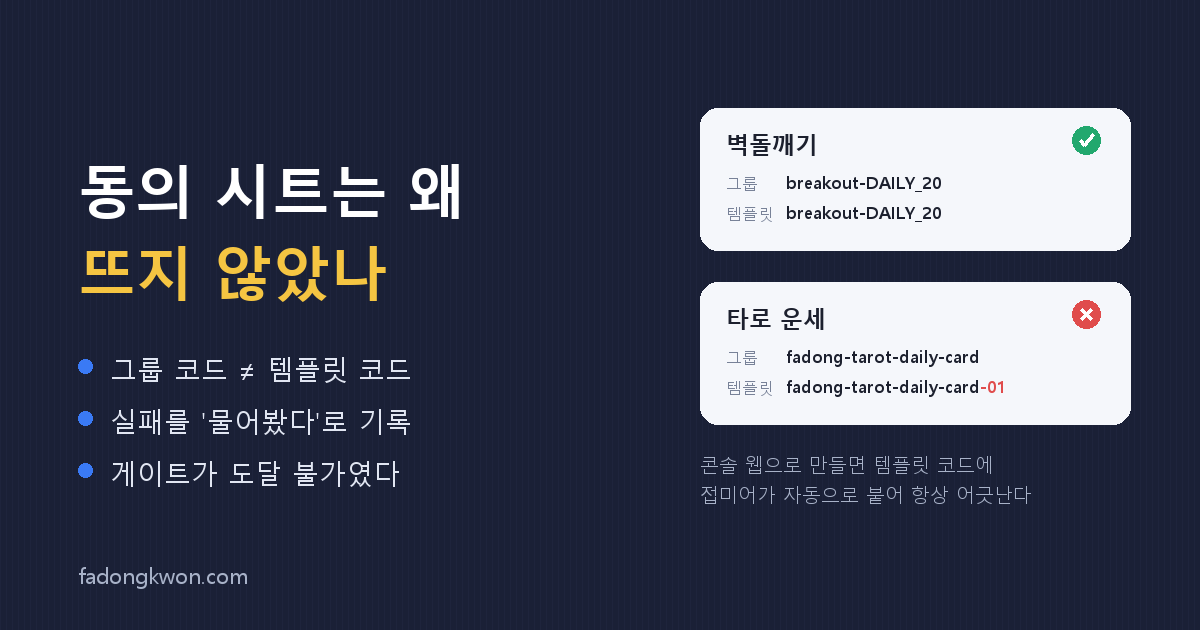
requestAgreement({ templateCode }) only finds a match when the group code and the template code are exactly identical. If they differ, the native layer rejects the call with NOTIFICATION_AGREEMENT_FAILED, and passing either of the two codes fails. I tried both. Both failed.
| App | Group code | Template code | |
|---|---|---|---|
| Breakout | breakout-DAILY_20 | breakout-DAILY_20 | match |
| Tarot | fadong-tarot-daily-card | fadong-tarot-daily-card-01 | mismatch |
| Memory Card | memory-card-daily-1900 | memory-card-daily-1900-a | mismatch |
When you create a template through the console UI, a suffix like -01 or -a is appended to the template code automatically. Everything I had made in the console was therefore mismatched without exception. Create it through the API and the value you pass goes into both the group and the template, so they match by construction.
The part that stings: the checklist in that post five days ago already said “group code = template code.” I followed the rule for every app I built in September, and never once compared it against the ones already sitting there from August. Knowing a rule and applying it to what you already own are two different jobs.
The check itself is one line. List the templates and compare joinedTemplateSet.code against templateSetList[0].code by eye.
Cause 2: recording a failed request as “asked” burned the device
You should only ask a device for consent once, so the app records that it asked in localStorage. It was writing that record before sending the request.
1
2
3
// before — recorded regardless of the result
localStorage.setItem(key, '1');
await requestNotificationAgreement(code);
When the request failed because of cause 1, the record was still written. That device would never see the sheet again. Fixing the server side would not bring it back. It is also why my own phone stayed quiet throughout the investigation.
1
2
3
// now — recorded only when the sheet actually opened
const res = await requestNotificationAgreement(code);
if (SHEET_SHOWN.has(String(res))) localStorage.setItem(key, '1');
SHEET_SHOWN is the set newAgreement, alreadyAgreed, agreementRejected. A rejection still means the sheet opened, so that counts. Anything else means it did not, so nothing is recorded and the next run tries again.
Cause 3: the gate was effectively unreachable
Opening the consent sheet the moment someone enters the app gets you rejected in review, so there is a gate: some number of rounds played, some minutes elapsed. Those counters lived in memory only.
A webview reload resets them to zero. In an app like Tarot, where a session is about a minute long, “three rounds and three continuous minutes in one session” never happens. A hook added to fix an audience of zero was about to produce an audience of zero.
Now the first-run timestamp and the cumulative number of plays are kept in localStorage so the gate accumulates per device, and a separate “at least one play in this session” condition handles the don’t-show-on-entry requirement.
What the full audit turned up
Once the cause was confirmed I went through every app, and the problem was not one kind.
- Apps with no consent request code at all — six of them, including Hangul Monsters and Math Monsters. Meanwhile the console had been running their daily notification schedule for weeks.
- Apps pointing at dead codes — Juice Spinner and Spin the Bottle referenced a group that had been stopped in August, and Saju Lotto had a code that did not exist at all, hardcoded in the source. Even a matching code would have failed.
How to fix it without losing consent
Consent attaches to the consent form (termsId), not to the template. That is what makes this repairable.
- Reuse the existing consent form and create only a new template whose group code equals its template code
- Point the app’s
push-consent.jsonat the new code and redeploy - Deactivate the old template
The existing schedule keeps going out to the same people who consented. I rebuilt ten templates this way and all of them were approved. Only one app needed a brand-new consent form, because the old wording could not pass AI review — I moved its send time to 8pm to match the other games while I was there.
What I took away
A green light in the console is not a success metric. Template approved, schedule active, delivery completed — all three can be true while the audience is zero, because “delivered” is reported even when nobody is targeted. The only number worth trusting is sentCount moving off zero.
And one more. The reason I fell into the same trap after writing the rule down is that I applied it only to things I had yet to build. When you learn a rule, you owe the things you already built one pass through it. This time I wrote down how to check, not just what the rule is.
To be honest about where this stands: what is confirmed so far is that the sheet actually opens. Breakout has its first consenting user, and if sentCount moves off zero in this evening’s send, the path from consent to delivery is confirmed end to end. Until I see that number it is not finished. This time I am not calling it the last mistake.