Three Card Games Almost Shipped Without Card Images — Sorting Out a Shared Deck, a Rotation Module and Landscape Layouts in One Pass
In a pre-release check of FreeCell, Spider and Pyramid, I found the standalone builds of all three contained no card images at all. They had only been borrowing Solitaire's deck inside the hub, so the standalone apps fell back to text-only placeholder cards. Here is how the deck became a shared package of 54 WebP images at 0.5 MB used by all four games, how the rotation button that existed only in Solitaire moved into a shared module with a new landscape layout per game, the problem of the bottom 60 percent of the table sitting empty in portrait, and the trap where an S Pen phone registered as a precise pointer and switched on the desktop stage in landscape, all from an 18-item review
한국어로 읽기 카드 게임 3종이 카드 그림 없이 나갈 뻔했습니다 — 공용 덱, 회전 모듈, 가로 배치를 한꺼번에 정리한 기록
To fill the Card Games hub I built FreeCell, Spider and Pyramid on October 22. The plan was hub-only, but once they were also going to Play as standalone apps, I ran a pre-release review on October 23. It covered 18 items, and the first one was a release blocker.
There were no card images
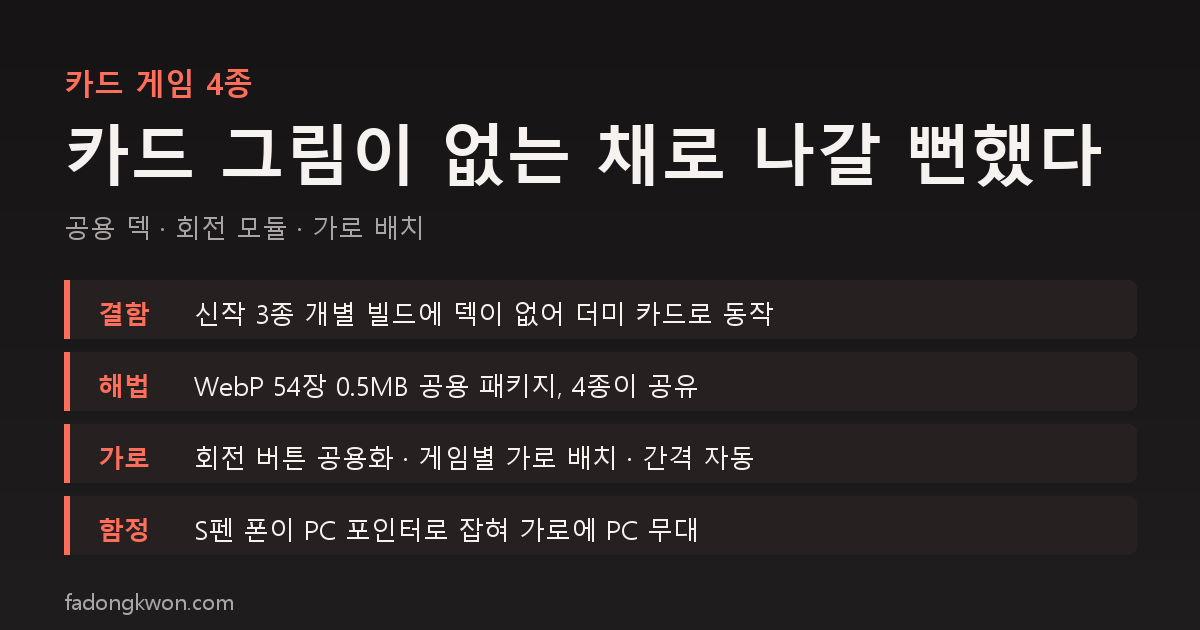
The build configs of the three games had the public folder turned off. The card images lived only in Solitaire’s public folder, and in the hub bundle the build tool keeps just Solitaire’s deck folder and lets the other card pages borrow it. Inside the hub the images rendered fine. But the standalone builds had no deck, so the image check failed and the games quietly fell back to text-only CSS placeholder cards. Looking only at the hub, I would never have noticed.
The fix was to move the deck into a shared package. The 54 PNGs at 4.9 MB were regenerated as WebP at 0.5 MB, with the corner rank and suit enlarged to a third of the card width. All four games point their public folder at the same package, so every standalone build carries the deck, while the hub bundle keeps sharing Solitaire’s single copy as before. The whole card hub is 1.2 MB.
Landscape existed only in Solitaire
The rotation button, the landscape layout and the native rotation call all lived inside Solitaire’s code alone. The Android manifest locks portrait, so tilting the phone does nothing; the app has to rotate through the bridge. I moved that block into a shared platform module so all four games use the same button and the same storage-key rule. It applies on entering a game and resets to portrait on leaving. On Toss the button appears only when the bridge is present.
Landscape layouts were designed per game. FreeCell sends its four free cells to a 2x2 on the left and four foundations to a 2x2 on the right, giving the eight columns the full height. Spider moves the stock and completed king runs to a left panel, and Pyramid moves the stock and waste to a right panel.
The bottom of the table was empty in portrait
In portrait, the spacing of cards stacked in a column was tied only to card width, so columns bunched at the top with the bottom 60 percent of the table empty. I changed it to pour the spare height into the column spacing. The gap now grows automatically up to the spare height divided by a maximum column length of 12 to 13 cards, capped at 0.55 to 0.6 of the card height. With wider gaps every corner index shows, which solved the legibility problem at the same time.
Suit distinction got a four-color deck option. Another 26 cards were generated with diamonds in blue and clubs in green, switched on from the home options under one storage key shared by all four games. The difference is largest in FreeCell and Spider, where cards are small. The selected run now lifts with a yellow band and shadow, and empty-slot markers got more opaque.
Two reports from phones
The day after release came “the side margins in FreeCell landscape are severe.” In landscape the card size was governed by width, and FreeCell counts 12 slots (cells 2x2 plus eight columns plus foundations 2x2), so on a 760-pixel-wide phone the cards came out at 50 pixels. I recounted the slot math for the landscape layout.
The next day came “side margins and the bottom banner in landscape on all four,” with a screenshot. The cause was somewhere unexpected. The condition for the desktop stage included “if a precise pointer is present,” and a phone with an S Pen registers as a precise pointer, so in landscape (600 pixels or wider) the PC-style rounded stage switched on. I dropped the pointer check and now split only on screen width and touch.
What is left
- Pyramid’s landscape card size went from 36 to 44 pixels with the panel layout, and cannot grow further.
- Moving the undo button into the HUD in landscape is on hold.
- The home option UI is unified as the same two-column grid across all four, and FreeCell gained start-by-deal-number and auto-complete.
Summary
- Without the pre-release check, three games would have shipped with imageless cards. It was a defect invisible from inside the hub.
- The deck is one shared package (54 WebP images, 0.5 MB), rotation is a shared module, and landscape layouts are per game.
- Empty portrait space is filled by scaling spacing to height, and suit distinction by the four-color deck.
- The two phone reports came down to slot math and a pointer condition. New card games follow the same package and rules.
The apps are listed under GAMES and APPS, and some can be played right in the browser. Updates go out on this blog and on Instagram (@fadongkwon.soft) (opens in a new tab).
Figures reflect work on October 23 and 24, 2026. Card sizes vary with device width and column count.