Moving Hub Apps onto Apps in Toss — Why I Withdrew the Shutdowns and Rewrote Existing Apps Instead
The 50-app workspace cap on Apps in Toss blocked every new hub registration. Shutting apps down did not free a slot because apps pending shutdown still count, so I withdrew ten shutdown requests and converted existing apps into hubs by changing their name, icon and bundle. Four non-game hubs went live within a day and five game hubs are in review. Here is what could be changed, what could not, how ad placements and user data carried over, and how the 1-won promotions were re-created per hub
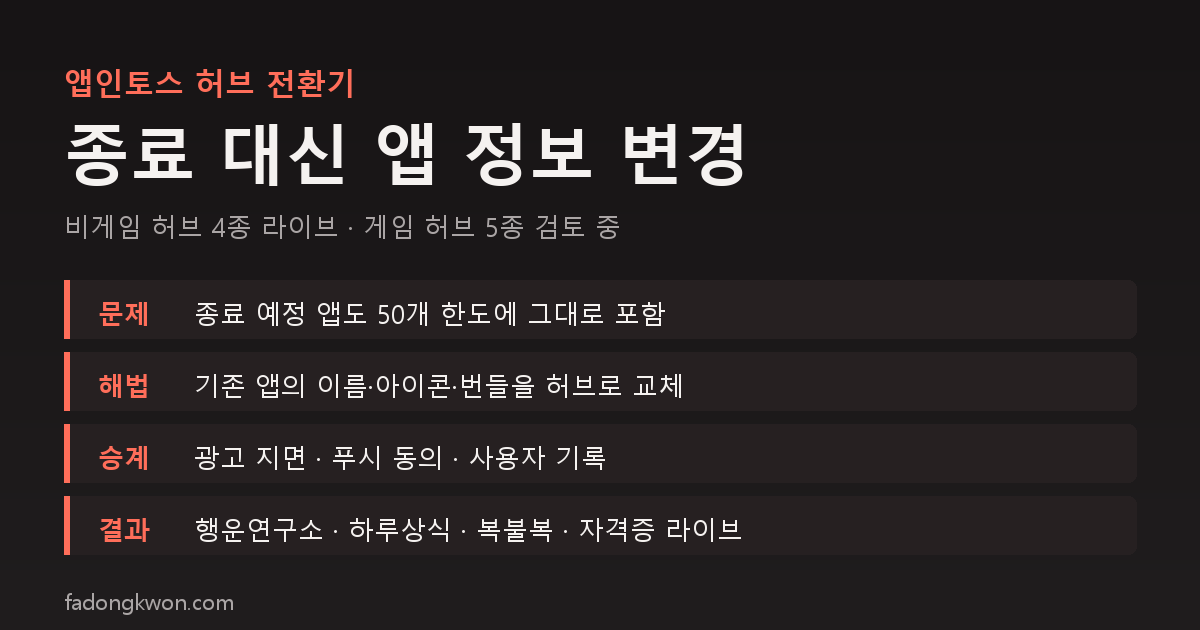
한국어로 읽기 앱인토스 허브 전환기 — 종료 신청을 철회하고, 기존 앱의 '앱 정보'를 바꿔 허브를 올렸습니다
In the last post I wrote that instead of shipping more apps, I would bundle games of the same kind into hub apps. On Google Play, five hubs went out first, starting with FDK Puzzle Cafe. The problem was Apps in Toss. The workspace cap of 50 apps was full, so a hub could not be registered as a new app at all.
This post is a record of how I got past that cap, and of what worked and what did not along the way. No amounts are included.
First attempt: shutting apps down
The first idea was simple. Shut down the least popular individual apps to free slots, then register the hubs in their place.
On Apps in Toss, shutting an app down is console-web only. The end date defaults to 30 days out and cannot be moved earlier. Search and benefits-tab exposure stop as soon as you file, the app closes automatically after 30 days, and until then the workspace owner can withdraw the request.
I picked the seven apps with the lowest revenue and user counts, filed the shutdowns, and immediately tried to register a hub. The error was unchanged. “A workspace can have at most 50 mini apps.” Apps in the pending-shutdown state still count toward the cap. The documentation does not say whether they stop counting after the actual shutdown 30 days later, and the guide has no concept of deletion at all.
I filed three more shutdowns, ten in total, and not a single slot opened. That is where I stopped and changed course.
Second route: change the app info of an existing app
The list of things you cannot change after registration on Apps in Toss turned out to be shorter than I expected.
| Cannot change | Can change |
|---|---|
| App identifier (appName, the intoss:// scheme) | Korean and English names, subtitle, description |
| App type (game / non-game) | Logo, thumbnail, screenshots |
| Age range, customer-support details | Category (within the same type), search keywords |
| Game rating (by swapping the store link), the bundle |
So if I took an existing app, replaced its name, icon, description and category with the hub’s, and uploaded the hub bundle, it would become the hub without registering anything new. The operating policy points the same way. The anti-abuse clause says that if you want to add new features or content, you should update your existing app.
Saving a slot was not the only upside.
- Ad placements stay. At the time, creating new interstitial and rewarded placements was broken (a notice said to wait for a fix), so a brand-new app could not have carried ads at all. I put the existing app’s banner, interstitial and rewarded placement IDs straight into the hub bundle.
- Push consent carries over. Users who opted into the daily reminder stay in the same consent group inside the hub.
- User data survives. Game pages inside the hub run under the same app identifier and use the same storage keys, so a Sea Battle record shows up unchanged in Sea Battle inside the Board Duel hub.
So I withdrew all ten shutdown requests. Pressing cancel in the console’s app-operations dialog returns an app to normal immediately. One thing did not come back, though. Before filing the shutdowns I had ended the 1-won promotions on four of those apps, and ending a promotion cannot be undone.
Which apps became hubs
There was one rule. Among the games bundled in a hub, the app with the lowest score becomes that hub. The score is a ranking score of 30-day revenue at 50 percent, user count at 30 percent and return rate at 20 percent. Picking a bundled app means its users move into the hub as they are, and since that game is inside the hub, from the user’s side the game did not disappear; more games appeared next to it.
| Hub | App that gave up its slot | Type | Status (early Oct 26) |
|---|---|---|---|
| FDK Lucky Lab | Save Instead of Lotto | Non-game | Live |
| FDK Daily Quiz | Daily Money Quiz | Non-game | Live |
| FDK Lucky Pick | Juice Spinner | Non-game | Live |
| FDK Exam Bank | Nursing Exam Bank | Non-game | Live |
| FDK Puzzle Cafe | Merge Pop | Game | App info in review |
| FDK Brain Check | Memory Cards | Game | App info in review |
| FDK Arcade | Rock Paper Scissors | Game | App info in review |
| FDK Board Duel | Sea Battle | Game | App info in review |
| FDK Olympics | Pixel Pong | Game | App info in review |
| FDK Card Games | Solitaire | Game | After the Play release |
Because the app type cannot change, a non-game hub can only come from a non-game app and a game hub only from a game app. Why Card Games is last comes below.
What happened within a day
I made the app-info changes and bundle uploads through the console MCP. Nine app-info requests and nine bundles went in during the evening, and the outcomes split completely by type.
- Non-game app info is approved instantly by AI. Within minutes of the call, the name and icon inside Toss had switched to the hub. The bundle, however, was still in review, so for a while an app called “FDK Lucky Lab” was running the old Save Instead of Lotto. Non-game bundle review is also fast, it was approved within the hour, and I pressed release to line them up. If I did this again I would submit the bundle review first and the app info second.
- Game app info is reviewed by a person. The stated window is three to seven business days. Game bundles are the opposite, AI reviews them, so they were approved first, but I am holding the release until the app info is approved so the hub bundle does not ship under the old name.
The part I worried about for game hubs was the game rating. Game-type apps on Toss take their rating from the IARC certificate attached to a Google Play store link. To put Puzzle Cafe in Merge Pop’s slot, the rating had to become Puzzle Cafe’s, and I assumed that could only be done on a console-web screen. In practice, sending the hub’s Play link and IARC number inside the app-info request put them straight into the review copy. The console web never came up. The flip side is Card Games. Its Play app is not registered yet, so it has no IARC number, and the Toss conversion cannot happen until the Play release is done. For game hubs, Play comes first.
There was one small trap. English names must capitalize only the first letter of each word, so the “FDK Puzzle Cafe” style prefix used on Play is rejected on Toss. The Toss English names go without the prefix, as Puzzle Cafe, Brain Check, Lucky Lab and so on.
What changed alongside
- The “More apps” list. In the cross-promotion list under every app, hub apps now sit at the top, ordered by similarity to the current app. The order of individual apps below them is unchanged. One registry line pushes this to every app, and the code side ships from the next build.
- Participant count in the Lucky Pick hub. Tools like the roulette, ladder and lots only let you change the number of participants with minus and plus buttons. Now you can type the number. This landed in both the hub and the individual apps.
- A quiz hub, later. The consonant quiz inside Lucky Pick does not quite belong with luck-based tools, so once head-to-head quizzes like trivia battles, twenty questions and riddles accumulate, it will move to its own hub. Until then it stays in Lucky Pick.
Promotions, re-created per hub
With the hubs up, the 1-won promotions needed re-creating too. The four apps that gave up their slots never had promotions, so nothing broke, but the hubs got new ones. One per live hub, with the benefits-tab mission written to fit each hub.
| Hub | Benefits-tab mission |
|---|---|
| FDK Lucky Lab | Get today’s fortune or this week’s numbers, 1 won once a day |
| FDK Daily Quiz | Answer today’s question in one subject, 1 won once a day |
| FDK Lucky Pick | Spin one tool once, 1 won once a day |
| FDK Exam Bank | Answer five questions, 1 won once a day |
One technical change was needed. Until now the payout lived inside each game, and in hub mode that code was switched off entirely, because paying one hub’s code separately per game would pay several times a day. This time I added a single hub-wide payout. The moment any game inside the hub finishes a round, the same point where today’s mission is recorded as done, the hub pays once per day for the whole hub, and only for sessions that arrived through the benefits-tab card. The Exam Bank hub uses a different shell, so it got its own hook at the fifth question answered.
The four promotions are in review, and the bundles carrying the payout codes went back into review. A test payout has to go through before they can start, so going live takes another day or two.
There is also cleanup. The promotions still running on Memory Cards and Pixel Pong carry the old codes and will stop paying out once the hub bundles go live. I plan to end them right before releasing the Brain Check and Olympics hubs and re-create them for the hubs.
Summary
- Putting hubs on Toss needed free slots, but apps pending shutdown still count toward the 50-app cap, so shutting apps down freed nothing.
- Instead, I replaced the app info and bundle of existing apps with the hubs. Only the app identifier and app type stay, and ad placements, push consent and user data carry over.
- Four non-game hubs went live within a day, and five game hubs are waiting on human review of their app info. Card Games comes after its Play release.
- Swapping the game-rating link worked through the API, and the English name prefix could not be used on Toss.
- 1-won promotions were re-created per hub on the four live hubs, with payouts collapsed to once a day across the whole hub.
When the five game hubs are approved, I will follow up with how that went and how return visits moved after the switch to hubs.
The apps are listed under GAMES and APPS, and some can be played right in the browser. Updates go out on this blog and on Instagram (@fadongkwon.soft) (opens in a new tab).
The procedures and constraints in this post are what I observed directly in the Apps in Toss console and developer docs on October 25 and 26, 2026. Policies and console behavior can change, so check the latest guide before doing the same.