Fifteen New Apps on Google Play in One Day — the Weekly App-Creation Limit Is a 7-Day Rolling Window, and It Stops You at Number 16
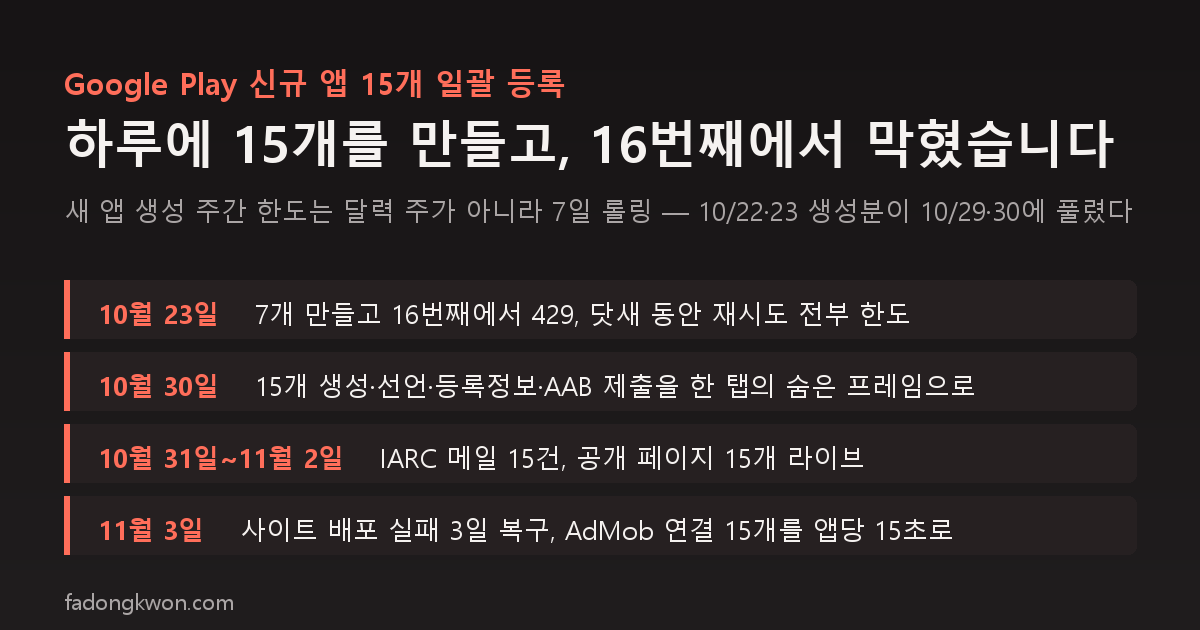
On October 23 the Play Console answered my sixteenth new-app request with "You have reached the weekly limit for creating new apps," and every retry for five days hit the same wall. The guess that it was a 7-day rolling window rather than a calendar week proved right on October 30, when I created fifteen apps and pushed declarations, store listings and AABs through to review in a day. All fifteen were live two days later. Here is how a single hidden frame drove the console, why the AABs had to be rebuilt right before submission, the three days the site stopped deploying, and the recipe that cut AdMob store linking to fifteen seconds per app
한국어로 읽기 Google Play에 앱 15개를 하루에 만들었습니다 — 새 앱 생성 주간 한도는 7일 롤링이고, 16번째에서 막힙니다
At the end of October a pile of apps was waiting for Google Play. Four of the nine game hubs that were not on Play yet, twelve new games going into the hubs, seven exam-prep apps built from the 7,200-question bank, and four quiz apps. Twenty-seven in all. This post is the record of creating and submitting fifteen of them on October 30 and getting all fifteen live on November 2. Along the way there was one Play Console limit and two mistakes of my own.
Blocked at number sixteen
On October 22 I created the five game hubs as new Play apps. On the 23rd, three card games and seven new games. That made fifteen. When I tried to create the eighth new game, the console replied:
You have reached the weekly limit for creating new apps. Please try again next week.
The API response was a 429. I could not find in the docs that the limit was fifteen, or what “weekly” meant. The 24th (Friday), 25th (Saturday), 26th (Monday) and 27th (Tuesday) all returned the same message. Once Monday the 26th was still blocked, a calendar week was ruled out. The remaining hypothesis was a 7-day rolling window: if you created fifteen apps in the past seven days you are blocked, and slots free up as the oldest ones pass seven days. If that was right, the five from the 22nd would free up on the 29th and the ten from the 23rd on the 30th.
On the 30th, fifteen went through and the sixteenth (the Exam Bank hub) got a 429 again. The rolling window was right. So the remaining five (the Exam Bank hub and the four quiz apps) wait until November 6 or later.
The five days of waiting were not wasted. I settled the order (four hubs, then five new games, then seven exam apps, then four quizzes) and prepared everything else: AdMob apps and ad units, AABs, store copy and graphics. On the 30th the only thing left was “create.”
How to create fifteen in a day
The Play Console has no API for creating an app. Listings, images, AABs and data safety can go through the API, but creating the app, the nine content declarations, store settings, country selection and submitting for review are web-only. That is about thirty page transitions per app, 450 for fifteen. On October 23 I did seven of them one page at a time through browser automation, and because every page meant a separate browser call, a single app took dozens of round trips.
On the 30th I changed the approach. Inside one console tab, open a hidden same-origin frame and page through it, filling values from script. Page transitions and saves finish inside the frame, so browser calls drop to a handful per app, and several frames can run several apps at once in one tab. Creating fifteen apps and finishing declarations, store settings, listings in English and Korean, 178 countries, production AABs and review submission took one day.
Things confirmed along the way:
- The console blocks
evalwith Trusted Types. You cannot fetch a script file and run it; the code has to go in whole. Fetching JSON, PNG and AAB files from a local server does work, and a 12 MB AAB goes into the file input throughDataTransfer. - The screenshot upload button changes its surrounding text once slots fill up. The first queue, which located the button by text, failed every save. Switching to “the last ‘Add asset’ button” fixed it.
- The contact fields in store settings now save with a value setter plus events. My earlier notes said keystrokes were required; that changed in between. Verified by reloading.
- The finance and health declaration pages load late. One app skipped a checkbox it could not find, so I ran it again.
- Right after saving countries, “Create new release” is briefly disabled. You have to wait before clicking.
- Right after submitting I reopened the publishing overview to confirm “changes in review,” and one app (Lucky Pick) had not actually been submitted. Without that check I would have found it a week later.
Mistake one: the AABs had to be rebuilt right before submission
The AABs for the five new games had been built on October 23. In the week since, the source had changed: typing the participant count directly, the consonant quiz’s exit handling, tidying the ladder game’s result list, and so on. The six exam apps had a shared shell that changed after their October 25 build too (cross-promotion v3 and the 1-won promotion notice).
Had I not checked “is the web bundle inside this AAB the current source” before submitting, the first live versions would have shipped with defects already fixed. I rebuilt eleven from current source, compared signing fingerprints, and uploaded those. A trap created by the week-long gap the limit forced. From now on the AAB build waits until right before creation.
Review took two days
The fifteen submitted on the night of October 30 got fifteen IARC rating emails on October 31, and on November 2 all fifteen public pages returned 200. The seven submitted on the 23rd went live in one day for two of them (Hoop Shot and Daily Spelling) and four days for the other five. Submitting fifteen at once did not make it slower.
What followed was the same sequence set out in the post about shipping fourteen games on one day.
- 27-locale listings went onto six apps. The other nine stay English and Korean only: World Geography is Korean-only as an app, Consonant Quiz is a Korean word game, Daily Quiz has five Korean-only subjects out of six, and the six exam apps are for Korean licensing exams.
- Penalty Roulette’s description said “9 languages supported” while the app has four (Korean, English, Japanese, Chinese). I fixed the English and Korean copy and the translations. The same kind of error I found in Pixel Pong while rewriting the Japanese listings.
- Korean graphics went up for nine apps. The upload script had been putting the English feature graphic in the Korean slot, which I fixed this time. A small recurrence of last month’s problem of 27 locales inheriting English screenshots.
- The app registry got its Play flags and the site was rebuilt. And that is where the second mistake happened.
Mistake two: the site stopped deploying for three days
From November 1 to 3 the site deploy had failed four times. When the registry flipped the five new games to “released on Play,” the site generated Play landing pages for them, and the app icon files those pages reference did not exist. The post-build link checker caught the broken images and stopped the deploy, and the other fixes pushed in between never reached production either.
I knew that a push is not a deploy, and still skipped the check. The cause was written out, file names included, in the annotations on the GitHub Actions run. I added fifteen icons (five new games, six exam apps, four quizzes) and redeployed. “Icons before flipping the Play flag in the registry” is now part of the order.
AdMob store linking in fifteen seconds per app
An ad-supported app needs “Add store” in the AdMob console after it goes live on Play before its ads are in a normal state. There is no API for this; console only. With fifteen to do, the method had to be nailed down.
Open the direct URL to the app’s settings page and paste the full Play Store URL into the search box. Searching by package name returns nothing right after approval, but the URL finds it. The search button is a Material button rather than a plain one, so it is matched by text; click the result row, save, and “Verification complete” appears. One script for that sequence ran fifteen apps at fifteen seconds each. I also confirmed through the AdMob API that the linked store info matches the Play package.
In numbers
| Item | Value |
|---|---|
| Created and submitted on October 30 | 15 (4 hubs, 5 new games, 6 exam apps) |
| Sixteenth attempt | 429, weekly limit |
| Review to live | Submitted 10/30, rating emails 10/31, 15 public pages 200 on 11/2 |
| Locale expansion | 6 apps to 29 locales, 9 apps Korean-only |
| AABs rebuilt before submission | 11 |
| Site deploy failures | Nov 1 to 3, four runs |
| AdMob store linking | 15 apps, 15 seconds each |
| Launch gate passed | 12 of 15 (the other 3 blocked on a Toss push item) |
| New Play registrations remaining | 5, after November 6 |
The launch gate includes marketing items such as the intro post, video and store video. The six exam apps, the five new games and the Card Games hub passed. Lucky Lab, Daily Quiz and Lucky Pick are done on the Play side but still have a Toss push-consent item open, so they have not passed. That is a different story from Play and gets its own post.
Intro posts for the fifteen: Card Games, Lucky Lab, Daily Quiz, Lucky Pick, World Geography, Ladder, Draw Lots, Penalty Roulette, Consonant Quiz, Care Worker, Cosmetology, Cook, Baking, Forklift and Excavator, Driver’s License.
What I learned
- The Play new-app limit is fifteen on a 7-day rolling window. Not a calendar week. If you plan to ship many at once, write down creation dates and count the slots seven days out. These figures are what I observed on my account between October 22 and 30; I could not find them in the official docs.
- Do not pre-build AABs while waiting on the limit. Build right before creating. Fixes made in between get left out.
- Console automation goes through one hidden frame. Calling the browser per page got seven apps done in a day; paging inside a frame got fifteen.
- Icons before the registry’s Play flag. And check that the deploy succeeded after the push.
- Link AdMob to the store by searching the Play URL. Package-name search returns nothing right after approval.
The apps are listed under GAMES and APPS, and some can be played right in the browser. Updates go out on this blog and on Instagram (@fadongkwon.soft) (opens in a new tab).
The limit figures and console behavior in this post are what I observed directly on my developer account between October 22 and November 3, 2026. Play Console limits and screens can change, so check the current state before doing the same.