The Toss "Ad Notice" Rejection — Toasts and Notices Both Failed, and Only One Layout Passed
Three of my apps were rejected at once in Apps in Toss review for "ads appear at a moment users can't anticipate." Toasts and always-on notices failed twice, and the only difference between the approved app and the rejected ones was where the notice sat. This covers applying that layout to 33 ad-supported apps in one review round, a tarot app whose identical code bounced between approval and rejection, and a single notice line that created a screen-sized gap
On September 21–22, three apps were rejected in Apps in Toss review for the same reason: Name Lotto, Spin the Bottle and Tarot Fortune. The rejection had a single item:
Ads appear at a moment users can’t anticipate. Please add CTA text or UI so users can recognize the ad before it appears.
Simple words, but nothing about what actually passes. It took a few more rejections before I got a feel for it. Here it is in order, in case it helps anyone adding ads to a Toss mini app.
Failure 1 — announcing with a toast
Tarot Fortune had already been rejected once for this, on September 18. So I added a “An ad is coming up” toast right before the ad, and kept a “An ad plays after you see the result” notice on screen at all times.
On September 21 it was rejected again for the same reason, even though the notice was accurate. A passing toast or a sentence that is always there is not tied to anything the user taps, and it seems not to count as a notice.
Failure 2 — asking with a confirmation sheet
Next I showed a sheet right before the ad: “The game starts after an ad,” with two buttons, [Watch ad and start] and [Maybe later]. It worked fine in the browser.
But on a real phone, tapping “Maybe later” still spun the bottle and showed the result. You cannot block the game because someone skipped an ad — that would be another reason for rejection. So the cancel button meant nothing at all. Do not ask with a choice the user cannot actually refuse. I reverted this design before submitting it.
The layout that passed — Saju Lotto
The answer was already in one of my apps. Saju Lotto had hit the same rejection and was approved on September 20. My four lotto apps share almost the same code, and the one difference between approval and rejection was where the notice sat.
| App | Notice position | Result |
|---|---|---|
| Saju Lotto | Below the button | Approved |
| Name, Car Number and Star Sign Lotto | Above the button | Rejected |
So I settled on three rules:
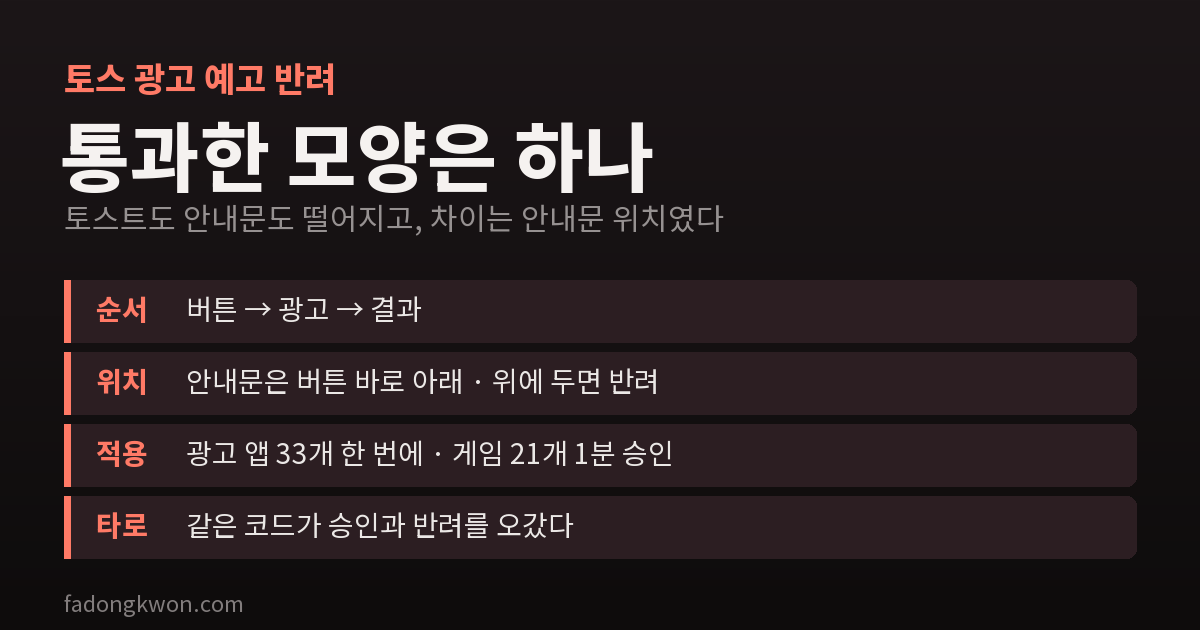
- Order: button → ad → result. Never show the result first and then the ad.
- Position: the notice goes right below the button. The same sentence above the button was rejected.
- Wording: do not point. Not “Tap the button below to…” but something like “An ad plays once before your numbers are drawn.” The button gets a 📺 mark.
Once the three lotto apps were changed to this layout, all of them were approved.
Eighteen hidden unannounced ads
While tracking down the cause I found a bigger problem. Most games used a “hearts” (entry ticket) system, and hearts had been switched off with a single switch in shared code. With hearts off, its place was taken by code that automatically showed a full-screen ad every three games, with no notice.
Eighteen apps I believed had hearts were actually unannounced full-screen ad apps. That is exactly why Spin the Bottle was rejected. The live versions had passed under the old standard, so every one of them would hit the same rejection the moment I uploaded a new bundle.
I considered going back to hearts, but what Toss asked for was a notice, not a different ad type. In fact Name Lotto used rewarded ads and was rejected just the same for lacking a notice.
Thirty-three apps at once
On September 29 I applied the same layout to all 33 apps with ads. Their ad setups differed, so I split them into four groups.
- 16 games with the hearts structure: only on turns where an ad applies, one line appears right below the start button: “📺 An ad plays before the next game.” Tapping it plays the ad, then starts the game. Mid-game extras like undo and preview pass without an ad, because an ad cutting into a game is also “a moment users can’t anticipate.”
- 7 apps with their own full-screen ads: I removed the full-screen ad right after the result; now tapping the next-game button plays the ad, then starts.
- 2 tarot apps: on a draw where an ad applies, each card back gets a 📺 mark, with a notice below the cards. Picking a card plays the ad, then flips the card.
- Nursing assistant mock exam: a notice below the submit button; submit → ad → grading. When time runs out and the exam auto-submits, the result shows right away with no ad.
On the web preview, where there are no ads, the notice is hidden too. Saying “an ad will play” where none plays would be a lie.
The results: 21 games were auto-approved within a minute, and most of the 12 non-game apps, which get human review, were approved. The only app rejected again for the ad notice was Tarot Fortune.
The same code, approved and rejected
Tarot Fortune and Tarot Ping are built from the same source; Tarot Ping just has a cuter look. Yet in the September 29 round, Tarot Ping was approved and Tarot Fortune was rejected.
Concluding it was not a code problem, I repackaged the same build and this time wrote the steps for the reviewer to check in the release note and memo:
- The first card has no ad.
- Tapping “draw one more” shows a 📺 mark on the card backs and a notice below the cards.
- Picking a card plays the ad, then flips the card.
On September 30 that version was approved.
On October 3 both apps were rejected again, with the ad layout exactly as approved. I resubmitted the same version of Tarot Ping unchanged, and it was approved on October 5. For Tarot Fortune I again rewrote the start of the release note as the checking steps and resubmitted, and after eight days of waiting it was approved on October 11.
What I took from this:
- A layout where tapping a card triggers the ad gets judged differently by different reviewers. Probably because it is less obvious than “button → ad → result.”
- When submitting a layout like that, writing the checking steps in the release note actually helped. Every version that passed had the steps in its note.
- If it keeps getting rejected, the next move is decided: after picking a card, show a “📺 Watch ad to see result” button — the same shape as Saju Lotto.
Bonus — a screen-sized gap from one notice line
On October 4, I got a report that in Star Sign Lotto and Name Lotto there was a screen’s worth of empty space below the “Before your numbers are drawn…” notice. You had to scroll a full page to see the text underneath.
The cause was one line of shared CSS. I had given the notice flex-basis: 100% so it would take a full line inside a row of buttons, but when it sits directly inside a screen that stacks vertically, that value becomes 100% of the height, not the width. One line giving flex-basis: auto to notices placed directly under the screen fixed it.
This bug did not show up in the web preview, because, as above, the notice is hidden on the web. To check the layout around a notice, you have to force the notice to show.
Summary
- A Toss ad notice has to be tied to something the user taps. Toasts and always-on notices did not work.
- The layout that passed: button → ad → result, the notice right below the button, and wording that does not point.
- Do not ask with a choice the user cannot refuse.
- One switch in shared code can change how ads behave in dozens of apps. When a rejection arrives, first check which structure the app uses, and fix every app with that structure at once.
- For layouts that reviewers judge differently, write the checking steps in the release note.
The UX principles Toss published alongside its October 22 exposure policy change also include “let users know in advance when an ad will appear” and “once they have watched an ad, show the result right away.” What I fixed to avoid rejection points the same way as the upcoming exposure criteria, so it is better done now than later.