Without a Rule, the Same Bug Comes Back — The Day I Flipped the Site's URL Scheme
English readers who clicked the privacy policy got stranded on the Korean site. The cause was that only the home page followed the opposite rule — the root was English while every other path defaulted to Korean. A record of unifying the rule across 449 files, stepping on three silent failures, and making tools catch all three
한국어로 읽기 규칙이 없으면 같은 사고가 반복됩니다 — 홈페이지 URL 체계를 뒤집은 날
This blog keeps Korean and English apart. Instead of putting both languages in one post, the addresses are split — a search engine assumes one language per URL.
But that address rule looked like this.
| Korean | English | |
|---|---|---|
| Home | /ko/ | / |
| Posts | /posts/<slug>/ | /en/posts/<slug>/ |
| About, tarot, tags, … | /about/ /tarot/ /tags/ | /en/about/ /en/tarot/ /en/tags/ |
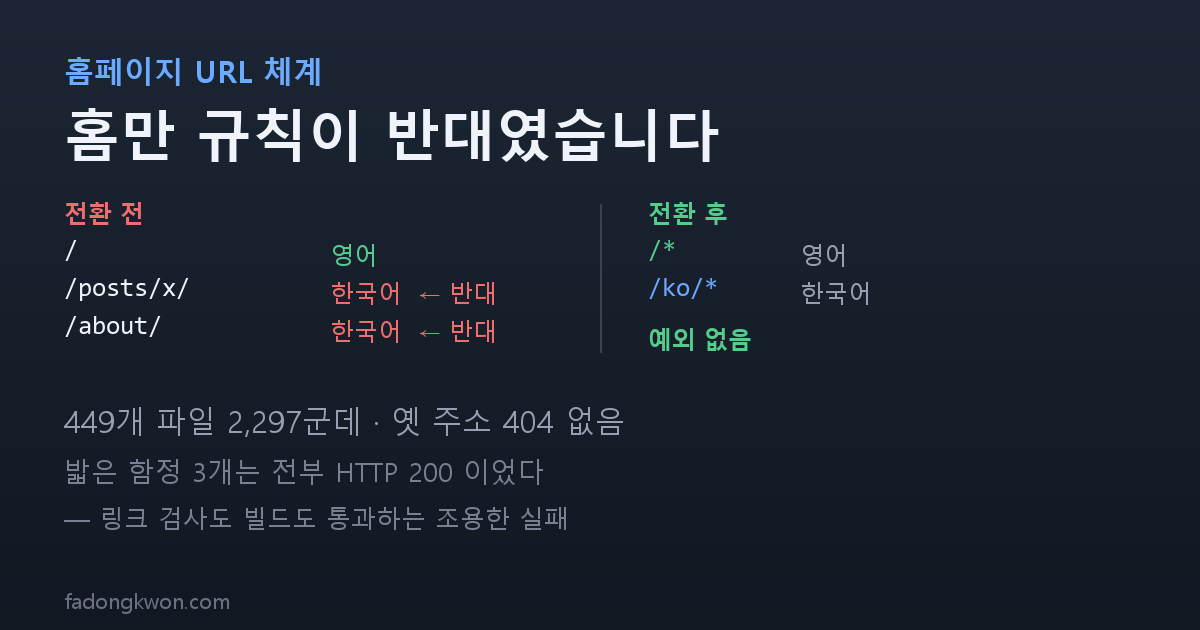
Only the home page follows the opposite rule. The root is English, yet everywhere else Korean is the default and English carries an /en/ prefix.
There is a reason it ended up that way. This site started out Korean-first, and to grow global search traffic I promoted English to the root. At that point I applied it to the home page only and left the rest alone. Each one worked, after all.
Without a rule, bugs happen
After a few weeks in that vague state, a real problem surfaced.
A reader browsing in English who clicked the privacy policy in the sidebar found that the site switched to Korean. And there was no way back.
Digging in, here is why. The privacy policy page already had English body text, but its front matter declared no language, so it inherited the site default — Korean. It had no paired English address either, so that page showed no language switcher at all. Because the page counted as Korean, every sidebar link became a Korean address, and from there on everything stayed Korean.
On a site built by one person this is invisible. I browse in Korean.
One rule, no exceptions
English is /*, Korean is /ko/*. No exceptions.
| English | Korean | |
|---|---|---|
| Home | / | /ko/ |
| Posts | /posts/<slug>/ | /ko/posts/<slug>/ |
| About, tarot, play | /about/ /tarot/ /play/ | /ko/about/ /ko/tarot/ /ko/play/ |
| Archives, categories, tags | /archives/ /categories/ /tags/ | /ko/archives/ /ko/categories/ /ko/tags/ |
| Privacy policy | /privacy/ | /ko/privacy/ |
I allowed exactly one exception: language-neutral addresses — the games you play straight in the browser (/play/<game>/), the Toss deep-link landings (/toss/<app>/), the children’s app pages (/kids/), and static files. A game follows the browser’s own language, and the rest are addresses the apps and the stores hold onto.
There were 2,297 occurrences across 449 files to change. Do that by hand and you will miss some. So I wrote the rule as a script and let the script perform the migration. That same file now serves as the rule document — so that months from now nobody looks at this and undoes it.
The rule changed in two places. One is _config.yml, which sets the default address of Korean posts; the other is the front matter of the English posts. Korean posts gain /ko, and English posts lose /en.
Before
1
2
3
4
5
# _config.yml
defaults:
  - scope: { path: "", type: posts }
    values:
      permalink: /posts/:title/
After
1
2
3
4
5
# _config.yml
defaults:
  - scope: { path: "", type: posts }
    values:
      permalink: /ko/posts/:title/
Before
1
2
3
# _en_posts/2026-08-12-apps-in-toss-launch.md
permalink: /en/posts/apps-in-toss-launch/
alt_url: /posts/apps-in-toss-launch/
After
1
2
3
# _en_posts/2026-08-12-apps-in-toss-launch.md
permalink: /posts/apps-in-toss-launch/
alt_url: /ko/posts/apps-in-toss-launch/
What happens to the old addresses
This is the part I worried about most. The Korean post addresses had been indexed since December 2024.
In the end not one of them 404s. The old Korean address /posts/x/ now serves the English version of the same article, and a Korean browser arriving there gets sent on to /ko/posts/x/ by the locale check. The address does not die; the language changes, and search rankings migrate to the new address over time.
The old English addresses are connected to the new ones with meta-refresh stubs. This file did not exist before the switch, so there is no before. Each old English address has one such stub.
After
1
2
3
4
5
6
7
8
---
layout: null
sitemap: false
permalink: /en/posts/apps-in-toss-launch/
---
<link rel="canonical" href="/posts/apps-in-toss-launch/">
<meta name="robots" content="noindex">
<meta http-equiv="refresh" content="0; url=/posts/apps-in-toss-launch/">
The stores and Instagram needed nothing
This was my biggest concern, and a full sweep turned up zero follow-up work.
| Address registered externally | Where it is used |
|---|---|
/privacy/ | Required for Play review, shared by every app |
/kids/, /kids/privacy/ | Required by the children’s app policy |
/apps.csv, /app-icons/* | The list apps fetch while running |
/toss/<app>/ | The value encoded in the Instagram card QR |
/app-ads.txt | The crawl path for ad verification |
All of them are language-neutral, so all of them stayed. In particular, the QR on the Instagram cards encodes /toss/<app>/, so there was no need to remake a single card. The captions never carried site addresses to begin with — links in an Instagram caption are not clickable.
I also left the website field registered with the stores pointing at the bare root. That field is the path ad verification follows to reach app-ads.txt, so adding a language prefix could break verification.
Three traps I stepped on
The script did the migration, but the build died twice. All three causes were the quiet kind.
One. The theme hardcoded the address prefix. I moved the Korean tag archives to /ko/tags/, but the tag list page still linked to /tags/<Korean>/ exactly as the theme original does. That space now belongs to the English tags, so it does not exist, and the link check killed the build with 283 errors.
The same problem existed for categories, and that one did not even trip the check. Category names are English words, so the prefix-less address happened to exist as an English page. It leaked quietly into the other language instead of 404ing, which made it more dangerous than the tags.
Two. I generated old-English-address redirects for scheduled posts too. They link to the address of a post that is not published yet, which kills the build. A scheduled post was never live at the old address, so there is nothing to preserve — I wrote the rule to skip future dates.
Three. This one was my own mistake. While documenting a file that overrides the theme, I put an HTML comment above the front matter. That stops the front matter from being the first line of the file, which breaks layout inheritance. The page shipped with no sidebar and the comment printed straight into the body. It returns HTTP 200 with working links, so the link check passes.
What people cannot catch, tools should
All three were things you had to see with your eyes, or could not see at all. So I attached a check to each.
- Fail if anything precedes the front matter — verified by deliberately breaking it
- A scheduled-post audit: Korean/English dates match, the URL rule holds, whether a published post links to a future one, and whether the home pagination pages exist
- Fail if a tab page has no title
That last one caught something real. While aligning the filename convention I gave the Korean tab files a ko- prefix, and for a page with no explicit title Jekyll derives the title from the filename. So the About page shipped with the title “Ko About”. That also returns 200 with working links. I found it while clicking through the menu on the live site.
I cleaned up the sidebar too
Eight rows sat in a flat list, which made it feel like a general store with odds and ends nailed on. Three different kinds of thing carried the same weight — the way in (HOME, ABOUT), the things I made (PLAY, TAROT), and the tools for finding posts (ARCHIVES, CATEGORIES, TAGS).
I put a thin divider between the groups and no labels. The privacy policy, being boilerplate, moved down to the icon row. I had tried text labels first, but the words felt awkward and the space above and below them stretched the list, so one line replaced them.
The divider’s color cost me a round too. The border color the theme provides differs from the sidebar background by only 8 in brightness, so it was effectively invisible. Using the text color at a low opacity makes it visible in both themes without defining separate values per theme.
What I take from it
Having no rule is not free. Leaving only the home page inverted saved five minutes that day, and after that it produced a bug that stranded English readers, a bug where the sidebar switched languages, and a tool whose check ran in the wrong direction. Unifying the rule today took far longer than those five minutes.
People cannot catch quiet failures. All three traps here returned HTTP 200. The link check passed and the build succeeded. They were things you had to look at, or could not see at all. So each time I found one I added a check, and I deliberately broke each check to confirm it actually catches the problem. A check you never break is a comment, not a check.
A rule belongs where it executes, not in a document. The script that performed the migration is the rule document, and the checking tools enforce that rule. Write it only in a note and you forget it next time — I had already forgotten, which is how this happened.
The apps are on Google Play and Apps in Toss, and the things you can try right in a browser are on PLAY. Updates go out here and on Instagram (@fadongkwon.soft) (opens in a new tab).