The Sound Was Only Late on iPad — Four Steps That All Waited for the Play Button
Hangul Monsters took noticeably long to read a word aloud. Android and desktop were fine; only Safari on iPad was slow. The cause was a single line. Every time the app spoke, it created a brand-new audio element, which meant everything from element creation to decoding happened only after the play button was pressed
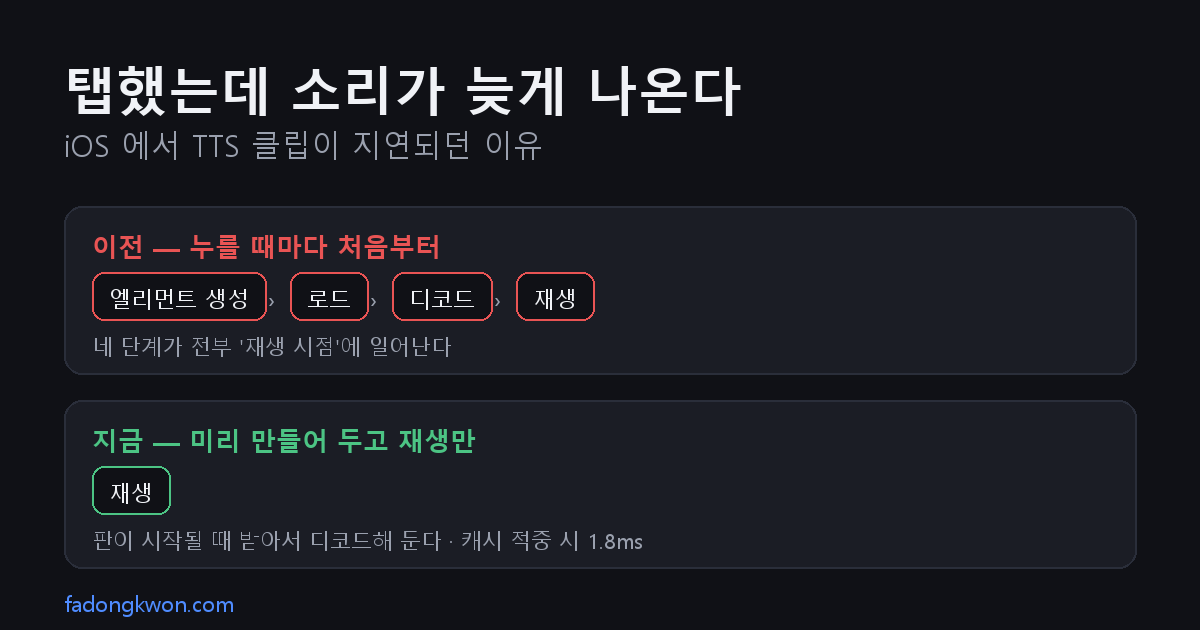
한국어로 읽기 아이패드에서만 소리가 늦게 나왔다 — 재생 버튼을 누른 뒤에야 시작되던 네 단계
Hangul Monsters reads words out loud. In listening mode you only hear the word and pick an answer from choices, so if the sound is late the game simply does not work.
On iPad it was noticeably late. The Android app was fine. Desktop browsers were fine. It happened in Safari on iPad, specifically when the app was added to the Home Screen and running full screen.
The code that made the sound
Hangul Monsters does not use the device’s text-to-speech. It ships 1,077 pre-recorded mp3 clips in the bundle and plays those instead, so the voice does not change from device to device.
The playback code looked like this.
1
2
3
4
5
6
7
function playClip(text, fallback) {
  const name = ttsClips?.[text];
  if (!name) return fallback();
  clipAudio?.pause();
  clipAudio = new Audio('./tts/' + name);
  clipAudio.play().catch(() => fallback());
}
Every time a word needs to be spoken it creates a brand-new audio element with new Audio(...) and immediately calls play(). It looks short and clear, and on Android and desktop it caused no trouble at all.
All four steps waited for the press
The problem is how much work that one line asks the browser to do. Before play() produces sound, the browser has to:
- create a media element
- fetch the source URL
- decode the mp3
- start playback
And all four happen after the play button is pressed. Nothing is done ahead of time.
Desktop and Android move through this quickly enough that you never notice. iOS pays a much higher cost for media elements, and a Home Screen app runs in an environment separate from the browser tab, so its cache is colder too.
One thing is worth pinning down here. An average clip is 14KB; all 1,077 together are 15MB. This was not a network problem. Fetching 14KB is negligible. The bottleneck was creating the element and decoding.
Prepare it first, then just play
The fix is simple in shape: take the first three of those four steps out of the moment of playback.
The Web Audio API splits audio into two separate jobs — fetching and decoding a file into an AudioBuffer, and playing that buffer. Decode ahead of time and playback becomes nothing but playback.
1
2
3
4
5
6
7
8
9
10
11
12
13
14
15
16
17
// fetch, decode, keep it in the cache
function loadClipBuffer(file) {
  const hit = clipBuffers.get(file);
  if (hit) return Promise.resolve(hit);
  return fetch('./tts/' + file)
    .then((r) => r.arrayBuffer())
    .then((raw) => new Promise((res, rej) => ctx.decodeAudioData(raw, res, rej)))
    .then((buf) => { clipBuffers.set(file, buf); return buf; });
}

// playback is just attaching the buffer and starting
function startClipBuffer(ctx, buf) {
  const node = ctx.createBufferSource();
  node.buffer = buf;
  node.connect(ctx.destination);
  node.start();
}
That leaves the question of when to prepare. A round is 20 questions. Twenty clips is 280KB, light enough to fetch in one go, so the app warms every word of the round the moment the round starts.
1
speech.prefetch(queue.map((q) => q.tts));
The multiple-choice buttons in listening mode also speak when tapped, so those get warmed as the choices are rendered.
What the numbers said
I instrumented a listening round locally to see which path playback actually took.
| Result | |
|---|---|
| Clips prefetched at round start | 23 |
| Playback path | all Web Audio (new Audio() called 0 times) |
| Tap → playback start, cache hit | 1.8ms |
1.8ms is effectively instant. The decoding is already done, so the only work left is attaching a buffer and calling start().
Tidied up along the way
iOS allocates resources per AudioContext, and because of autoplay policy a context stays suspended unless you wake it on the first user touch. This app’s sound effects also used an AudioContext, and it was creating a separate one. So I merged them into a single shared context and wake it once on the first touch.
I also kept the old new Audio() path as a fallback for environments without Web Audio or where decoding fails. Sound arriving late is better than no sound at all on a device where the new path does not work.
What stays with me
This bug only reproduced on one kind of device, and never once in the environment I develop in.
Looking back, there is nothing wrong with the code that caused it. Creating an element with new Audio() and calling play() is the textbook approach and works nearly everywhere. I had simply never thought about how much work that line asks the browser to do, and when it asks for it.
When something is slow I usually look for what is slow. This time the answer was when the work happens. The same work, done while the user waits or done before they ask, is not the same thing at all.
The web version already has the fix. The Android (Play) and Apps-in-Toss builds carry the same change and are waiting on review.