The Revenue Ledger, Three Weeks On — Toss and Play Ad Revenue and 1 KRW Promotions in One Command
With 46 apps now in the ledger, Play ads back on and a 1 KRW promotion running, the daily collection command has grown to five steps. Why Toss revenue collection kept failing silently, AdMob revenue collection, promotion payout collection, a dashboard that expands each app in place, and unified Toss and Play names — plus three menus we would like in the Apps in Toss console
Info
Three weeks after building a revenue ledger for our apps, it now covers 46 apps on two platforms. One command collects Toss ad revenue, Toss 1 KRW promotion payouts, AdMob revenue for the Google Play apps and Play reviews, then rebuilds a single-file dashboard. This post covers what broke, what was added, how to read the numbers, and three menus we would like to see in the Apps in Toss console.
What Changed in Three Weeks
On 15 September I wrote about the ledger that gathers revenue from 27 apps into one screen. Three things have changed since.
- There are more apps. The dashboard now tracks 46.
- Our ad account suspension ended on 24 September, so ad revenue from the Google Play apps started coming in again.
- On 1 October we started a 1 KRW promotion on the Toss benefits tab (how it started). Now we need to watch the money going out as well as the money coming in.
So the update.cmd I run every morning now has five steps.
| Step | What it collects | Source |
|---|---|---|
| 1/5 | Toss ad revenue | Apps in Toss console API |
| 2/5 | Toss promotion payouts | Apps in Toss console API |
| 3/5 | Play ad revenue | AdMob API |
| 4/5 | Play reviews | Google Play Developer API |
| 5/5 | Reports and dashboard | The ledgers above |
1. Toss Ad Revenue — Fixing a Collector That Failed Silently
For a while, some runs ended with nothing but failed: None. I assumed the login had expired. It had not.
Toss revenue is collected by calling Claude from the command line and having it call the console API for us. I had capped the exchange at three turns, and a normal call used exactly three. But the Toss API takes 55–60 seconds per call and sometimes times out. One retry pushed the run past the cap, the result came back empty, and None was printed.
Three fixes:
- The cap is now six turns.
- The model no longer copies the response out; the script reads the raw tool output directly. Copying a 50 KB JSON used to take three to four minutes; now the whole step takes about one, and transcription errors are gone. I compared 376 rows from 13–25 September against the old ledger and found zero differences.
- Once there were 33 apps, the response passed 50 KB and was diverted into a separate file. The script now reads that file path and unpacks it itself.
2. Play Ad Revenue — AdMob Joins the Ledger
Ad revenue for the Play apps comes from AdMob. Unlike Play reviews, the AdMob API does not support service accounts, so the first run needs a one-time consent in the browser.
- Publish the consent screen as “In production”. Left in “Testing”, the authorisation expires every seven days and you consent again every week.
- Amounts are requested in KRW regardless of the account currency, so they add up with Toss.
- App names come from the Play package linked in AdMob and are matched to the Toss names.
It also now tells a zero day apart from a day that was never collected. Neither Toss nor AdMob returns a row for a day with no impressions, so in the ledger both look like the same blank. Now the queried date range is recorded separately, and blanks inside it count as zero. The suspension from 26 August to 24 September shows up as zero, not as missing data.
3. Total, Toss, Play — Split the Platforms or Add Them Up
A Total · Toss · Play switch now sits at the top. Pick one and every metric, chart and table is recalculated for that platform. In the total view each table gains a Toss column and a Play column, and the “this month” card shows both shares.
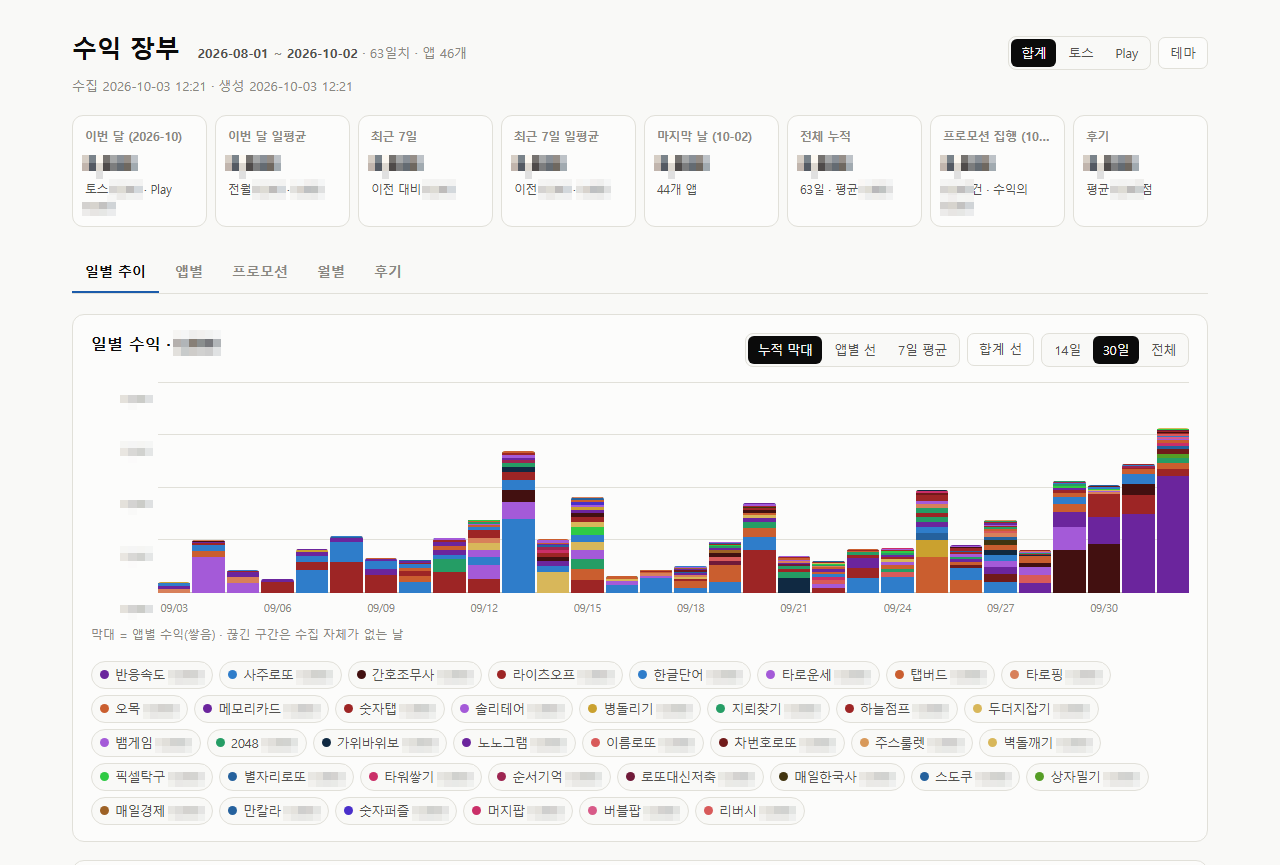 The total view. The this-month card splits Toss and Play, and promotion spend has a card of its own. Figures are blurred
Both Toss and AdMob are loaded only up to yesterday. If one side had today’s numbers and the other did not, the last day of the total would be a fragment and look like a sudden drop.
4. Each App on Its Own — Expands in Place
Click an app in the per-app table and its daily revenue opens right below it. No page change, and only one app is open at a time.
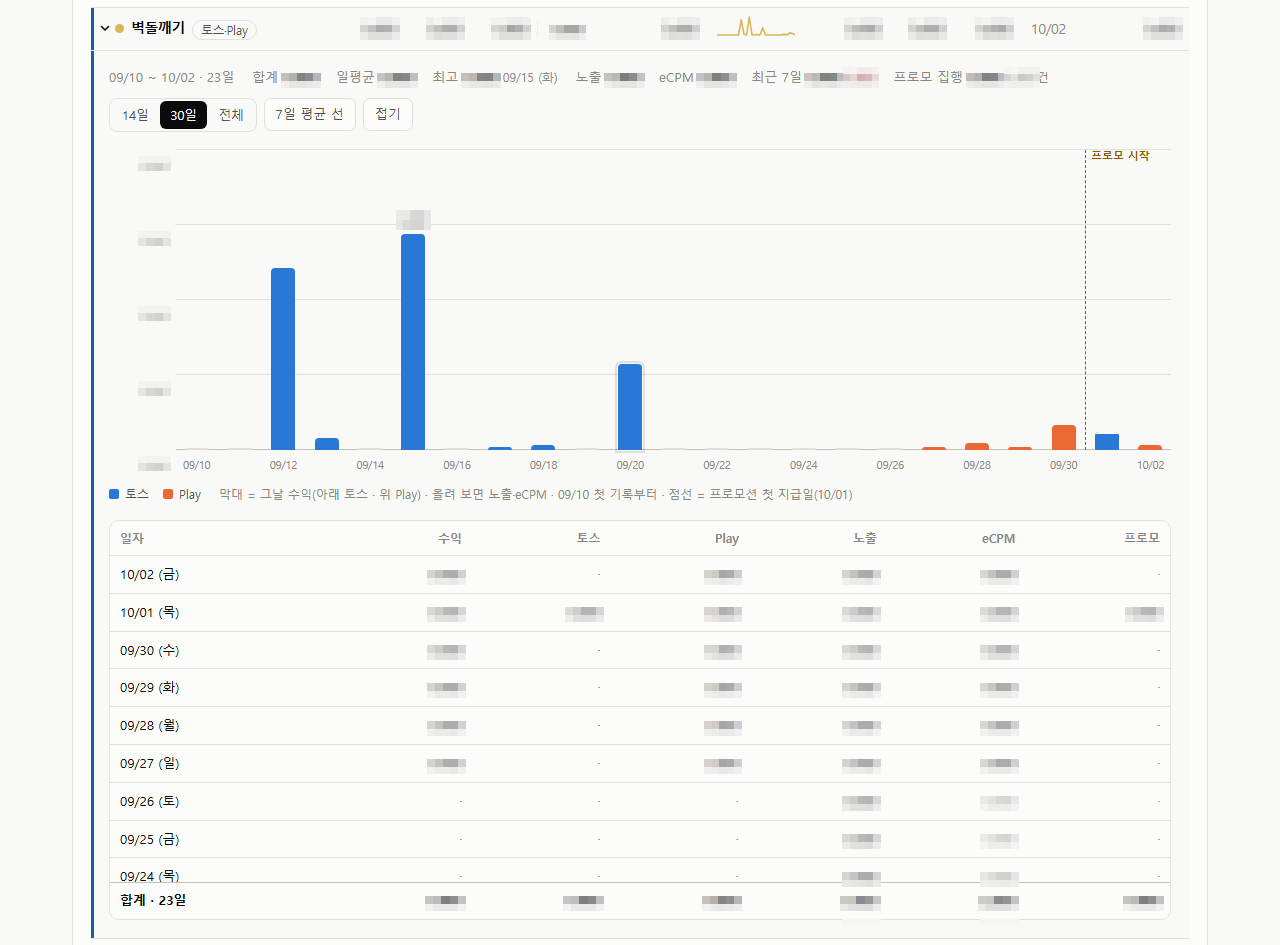 Breakout expanded. Toss is stacked below and Play above; the dashed line marks the first promotion payout. Figures are blurred
- Changing the period (14 days, 30 days, all) updates the summary, chart and table together.
- Days before an app launched count as “no data”, not zero. A mid-September app’s 30-day average no longer looks low because of pre-launch zeros.
- Apps running a promotion get a dashed line on the first payout day, so the change in ad revenue before and after is visible at a glance.
5. Promotion Payouts — The Money Going Out, Next to the Money Coming In
With the 1 KRW promotion running in 26 apps, I wanted to see every day how many people each app paid. So step 2 is new.
- It collects the promotion list with status, budget, amount used and the business wallet balance.
- Payout history is fetched only when the ledger total differs from the console’s amount used. With no new payouts, the step ends in about 12 seconds.
- The promotion list does not say which app a promotion belongs to, so the app is worked out from the address the card opens (
intoss://app-name/).
The dashboard has a new Promotions tab. For each app it puts the average daily Toss ad revenue in the seven days before the first payout next to the average since, and computes ad revenue per 1 KRW spent. If 1 KRW brings in more than 1 KRW, we keep going; if not, we stop.
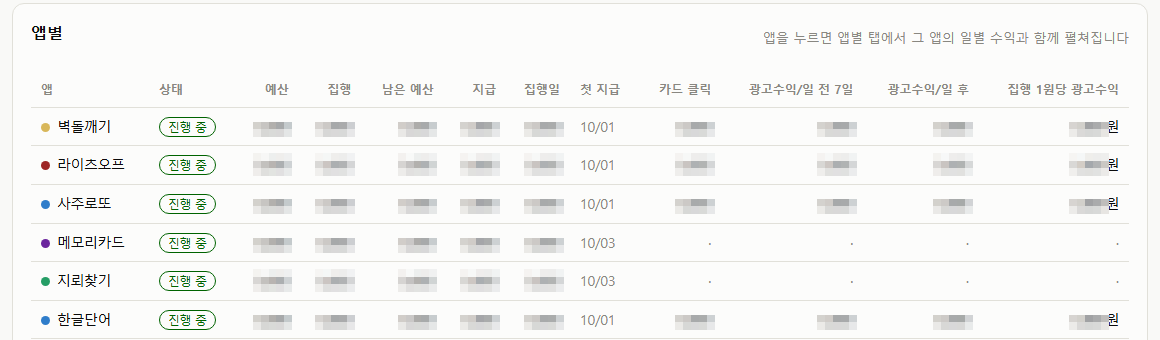 Each app gets one row with its budget, spend, and ad revenue before and after the first payout. Figures are blurred
6. One Name for Toss and Play
The dashboard showed “Name Lotto” and the full Play store title of the same app as two separate rows. The Toss side used a label I had written; the Play side came in with the store title registered in AdMob. As a result, our four lotto apps looked as if they earned nothing on Toss.
Now, when a new app appears, the ledger looks it up in the app registry (a file with the Toss app name and the Play package on one line) and gives both sides the same name automatically. An app found nowhere triggers a warning. Nine split apps were merged, and the total did not change by a single won.
Separately, Play review collection used to stop on a temporary Google error (503); it now retries after 2, 4 and 8 seconds.
What Reading the Numbers Taught Me
Looking at the ledger every day taught me several ways to misread it.
- Yesterday’s revenue is only about half there that night. Toss revenue, and even impression counts, are corrected over a day or two. One day grew by 81% when I fetched it again the next day. Decisions wait for numbers two days old, which is why the ledger re-fetches the last 14 days in full every time.
- Impression counts depend on which API you ask. The performance report leaves out impressions that earned zero. Trusting it, I once concluded that one app’s ad slot had died. Impressions now come from the same source as the console’s in-app ads screen; only revenue and eCPM are compared from the performance report.
- The “per user” denominator is not people. The user count in the ad report was 3.5–7 times the daily active users over the same period. What one person earns per day has to be divided by daily active users from the dashboard.
What We Would Like in the Apps in Toss Console
Moving between console menus while building the ledger, I came across three places I would like to see changed.
① Move settlement out of the app menu Right now the settlement history lives under “In-app ads > Settlement” inside each individual app’s menu. But what it shows is not that app’s settlement; it is the settlement for every app in the workspace. Whichever app you open it from, you get the same workspace-wide history. Since the content covers the whole workspace, the menu belongs one level up, at the workspace level, not under an app.
② An ad performance overview A screen that shows ad revenue, impressions and eCPM for many apps as a single app × date table. I asked for this in the previous post too, and with 46 apps it matters even more. This ledger is, in the end, that screen built by hand.
③ A promotion overview Once a promotion is running in 26 apps, you want to see at a glance how much of each budget is gone and how many people each app has paid. Status, budget, amount used, payouts and card clicks per app, plus daily totals, on one screen would be ideal. For now I added a promotion step to the ledger just to see this.
If anyone from Apps in Toss reads this: please consider where the settlement menu sits, and an ad performance overview and a promotion overview. For partners running many apps, an overview, not a per-app screen, becomes the first thing they open every day.
Still To Do
I still run the command by hand once a day. Toss reviews can only be fetched from a browser that is logged into the console, so they are handled separately. Even so, opening dozens of console screens every morning has shrunk to one command and one dashboard.
The numbers themselves will come with the promotion check on day seven. News comes through this blog and Instagram (@fadongkwon.soft) (opens in a new tab).