The Code Said "Not Supported" — It Had Been Working All Along
The Apps in Toss build of Hangul Monsters hid its speech mode entirely and ran listening-only, because the code hardcoded available:false on the belief that the Toss WebView had no speech recognition. The question that unravelled it: if it works in a browser, why not in Toss, which is also a web app? Measuring it showed recognition had been there the whole time. A story about one unverified assumption cutting a feature in half
Hangul Monsters has a listening mode, where you hear a sound and pick the right letter, and a speaking mode, where you read into the microphone. On the Apps in Toss build, the speaking mode was simply absent. No mic button, and the sentence-reading mode missing from the list.
The reason was written into the code:
1
2
3
4
5
function createTossSpeech(): Speech {
  return {
    available: () => false, // no mic path — speaking variants stay hidden
    listen: () => Promise.resolve({ ok: false, text: '', error: 'unsupported' }),
    ...
Believing the Toss WebView had no Web Speech API, it returned false without ever asking. The comment even said so: “no recognition and no synthesis.”
The question that started it
It works in a browser. Open Hangul Monsters from the play-in-your-browser page and it asks for microphone permission, and the speaking mode works fine.
Which makes no sense. A Toss mini app is a web app too. The same bundle, the same code, running in a WebView inside the Toss app. If it works in a browser, why not in Toss?
Retracing it, the basis was thin. I had once confirmed that web speech recognition did not work in my own Android wrapper app, and since Toss is also an Android WebView, I assumed the same. There was no record of ever checking inside the Toss WebView itself.
So I measured it
There is only one way to remove an assumption: print the actual value. I attached a debugger to the Android System WebView and checked for both objects.
1
2
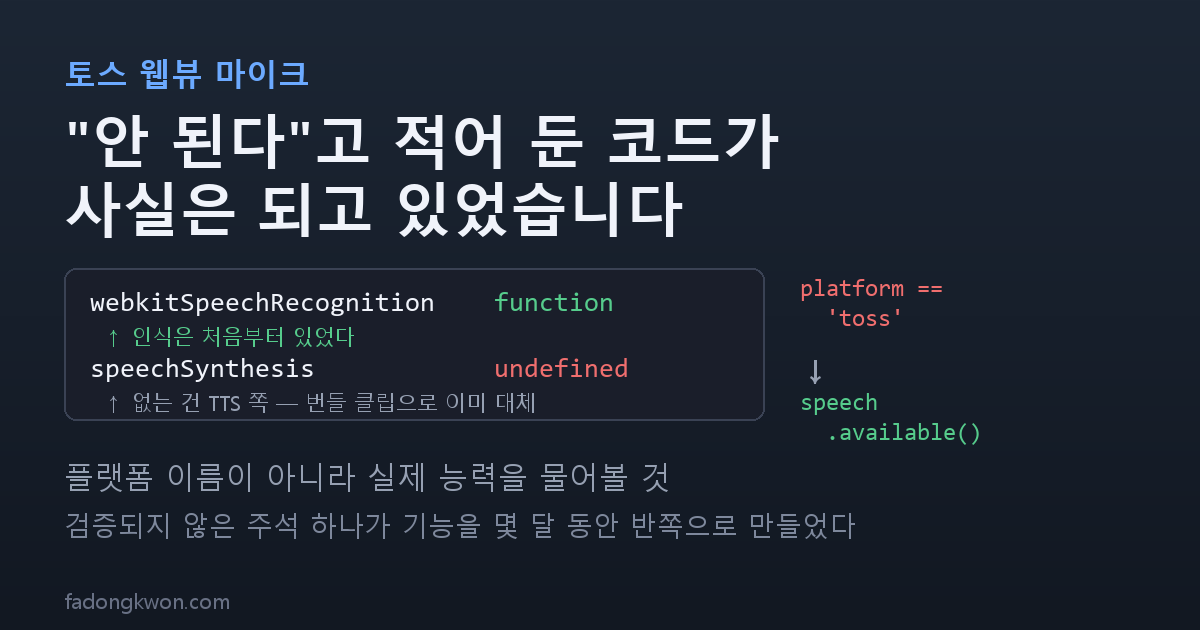
webkitSpeechRecognition   function     ← present
speechSynthesis           undefined    ← only this one missing
Speech recognition had been there all along. What was missing was speech synthesis.
Actually starting a recognition ran start → audiostart → end with no error. There was exactly one condition: the host app that owns the WebView has to allow the microphone request. When a page asks for the mic, an Android WebView asks the host app via WebChromeClient.onPermissionRequest, and the default implementation simply denies it. My own wrapper used that default, it got denied, and I misread that as “the WebView has no API.”
The missing TTS was real but harmless. Hangul Monsters already bundles pre-recorded voice clips and plays them ahead of any device TTS. I did that so a child would not hear a different pronunciation on every device — and that choice paid off here.
The fix was three lines
First, drop the Toss-specific stub and use the web implementation:
1
2
3
4
case 'toss':
  // The Toss WebView is an Android System WebView, so webkitSpeechRecognition exists.
  // If the host allows onPermissionRequest, start→audiostart→end runs without error.
  return createWebSpeech();
Second, declare the microphone permission in the Toss wrapper config. Apps in Toss expects a mini app to list the permissions it uses:
1
permissions: [{ name: 'microphone', access: 'access' }],
Third — and this is the heart of the incident — the game code read like this:
1
const kListenOnlyBuild = detectPlatform() === 'toss';
It was inferring a capability from a platform name. So every environment that actually could use a mic was blocked along with the ones that could not. It became:
1
const kListenOnlyBuild = !speech.available();
Ask about the actual capability, not the platform. Now if the Toss WebView changes, or a new environment appears, there is nothing to edit.
Opening it up surfaced another bug
Once speaking mode appeared on Toss, a report came in: the round where you press “Allow” on the permission prompt recognizes nothing, and you have to leave and come back for it to work. The same happened on the web.
Digging in, there was not one cause but four.
One. Recognition started the instant the prompt closed. While the permission prompt is open the page is in the background. On top of that, the mic track opened to obtain permission had just been closed, so the device was still releasing. Starting then means no audio attaches. Now, only right after the first grant, it waits for the page to come back and pauses 400 ms. Later rounds never take that path.
Two. Every start failure was flattened into “unsupported.” This was the real source of “broken for the whole round.” The caller treats “unsupported” as fatal and closes the speaking mode entirely. But the actual exception was InvalidStateError — meaning the previous recognition was still cleaning up. A retryable condition was being reported as permanently impossible. It is now classified separately as busy and routed to the retry path.
Three. The previous recognition instance was never disposed. If the last round’s instance still holds the microphone, a new recognition dies silently. An abort() now runs before each start.
Four. The Android native path had a timeout problem. While the OS permission dialog is open, the native side sends no callback at all, yet the 12-second JavaScript timer keeps running. The wait expired while the user was reading the dialog and reaching for the button. The timer is now re-armed when the screen comes back.
Where it stands
Hangul Monsters vc19 (1.7.1) and a new Toss bundle went out, verified on a real device. Speaking mode appears on Toss, and recognition works from the very first round you grant permission.
The case where the Toss app denies the request is handled too: denied comes back and the app falls through to keyboard input, so the questions remain playable without a mic.
What I took from it
A comment saying “not supported” can be an unverified guess. This code returned available: () => false for months, with a reason written right beside it. Because the rationale was documented, I never questioned it. In truth it was an observation from a similar environment, transcribed into a different one.
Inferring capability from a platform name is how that mistake sets. platform === 'toss' is a claim you cannot verify. speech.available() is checked on the spot. With the latter, wrong assumptions correct themselves.
Asking “but why not?” one more time is the cheapest debugging there is. This started from noticing I could not explain why something that works in a browser fails in Toss. All I did was refuse to skip past the part that made no sense. The measurement itself took five minutes.
Hangul Monsters is on Google Play and Apps in Toss, and you can play it in a browser. Both monster apps are completely free. Updates go out here and on Instagram (@fadongkwon.soft) (opens in a new tab).